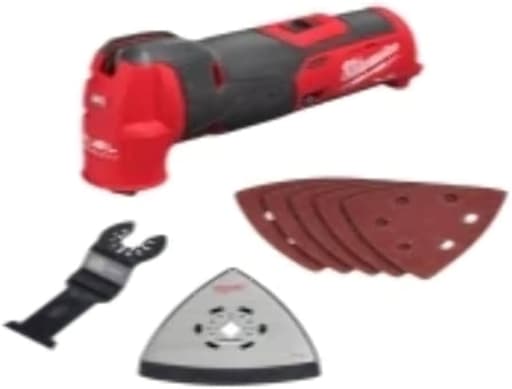
Features
- Fast cutting speed with adjustable oscillation rates
- Low vibration for more comfortable use
- Tool-free blade change for quick accessory swaps
- Integrated LED light for visibility in low-light conditions
- Compatible with all M12 batteries
Related Tools
Related Articles

Cordless oscillating multi-tool for cutting, sanding, scraping, and related tasks. Provides adjustable oscillation rates, reduced vibration for more comfortable use, tool-free accessory changes, an integrated LED for low-light visibility, and compatibility with M12 battery platforms.
Milwaukee Oscillating Multi-Tool Review
Why I keep reaching for the M12 multi‑tool
A good oscillating tool fades into the background and just lets you work. That’s been my experience with Milwaukee’s M12 multi‑tool over several months of remodel tasks—flush‑cutting jambs, notching sheathing, trimming back old nails, scraping caulk, and sanding odd corners. It’s compact, it cuts quickly, and it sends noticeably less buzz into my hands than most compact multitools I’ve used.
This isn’t Milwaukee’s biggest or brawniest oscillating platform, but in day‑to‑day use the balance of speed, control, and size is spot on. It’s the one I grab first for most punch‑list chores and indoor finish work.
Build, ergonomics, and controls
The in‑handle M12 battery keeps the tool’s profile slim and the balance neutral. In tight spaces—inside cabinets, under sinks, between joists—that slimmer handle matters more than you’d think. The rubber overmold is grippy without feeling gummy, and the overall size suits both one‑handed control and a second hand on the nose for plunge cuts.
Controls are simple: a slide on/off switch near your thumb and a speed dial on top. The LED is bright and well‑placed; it actually lights the cut rather than just the space in front of it. I also appreciate that the accessory head is compact, making flush cuts close to surfaces easier.
Vibration control is a standout. Some oscillating tools feel like they’re trying to leave your hands, especially at higher settings or when a blade starts to dull. This one stays planted. Less tingling in your fingers means straighter cuts and less fatigue over a long day.
Cutting performance
Speed is the M12 multi‑tool’s calling card. With a sharp wood blade, it plunges into 2x material cleanly and tracks well even across knotty grain. In framing repairs, I’ve used it to nibble out notches and clean up pocket corners where a circular saw couldn’t reach. It doesn’t bog easily; the motor holds a steady oscillation rate under load, so the tool feels predictable as you push.
In trim and flooring work, starting a cut at a lower dial setting helps keep the blade from skating, and then I’ll bump the speed up for the main cut. The tool isn’t finicky about blade brands; standard open‑back oscillating accessories seat well and stay tight.
On metal, it does what you’d expect for a compact 12‑volt: good for finish nails, screws, copper, light brackets, and the occasional bolt head, provided you use a bimetal blade and let the tool do the work. If you’re routinely slicing thick fasteners or stainless hardware, you’ll want a bigger platform—or extra patience and fresh blades.
Sanding performance is what an oscillating tool’s sanding performance always is: extremely convenient for corners and profiles, not a replacement for a dedicated sander. Dust builds quickly unless you pair it with a vac and an interface pad designed for extraction.
Vibration, noise, and control
Milwaukee clearly invested in vibration damping. Even at higher dial settings the tool doesn’t “walk” across surfaces the way some do, which reduces the need for a death grip. Noise is on par with other compact multitools; the pitch feels less harsh than some high‑speed models, but you’ll still want hearing protection in confined spaces.
The low‑vibration feel translates into cleaner plunge starts, more accurate flush cuts, and fewer accidental digs when you’re trying to feather in a reveal. If you’ve shied away from multitools because they leave your hands buzzing, this one is different.
Speed dial vs. variable‑speed trigger
Here’s the biggest control difference compared with some competitors: there’s no variable‑speed trigger. You set your speed on the dial and the slide switch turns the tool on or off.
Pros:
- Consistent speed through a cut, even when your grip shifts
- Easy to set a “ceiling” for delicate work (veneer, soft trim, grout cleanup)
Cons:
- Ramping up into a cut takes two motions: start at a low dial setting, then bump the dial up
- Adjusting speed mid‑cut is a little fiddly if your off hand is stabilizing the nose
In practice, I start at a low number for plunge starts, then nudge the dial with my thumb once the blade is established. It’s a small compromise; if you live and die by a trigger for feathering every cut, you’ll notice it.
Accessory changes
Blade swaps are tool‑free but two‑step: flip the lever, loosen the thumb screw a few turns to release or reposition the blade, then tighten and lock the lever back down. It’s quick enough once you develop muscle memory, and the clamp holds blades securely without creep.
What it’s not is a true one‑motion, spring‑loaded change. If you’re constantly swapping orientations and accessories, those extra twists add up over a day. Also note: this head doesn’t accept the no‑touch “click‑on” style accessories some pro systems use. Standard open‑back oscillating blades are the right match here.
Battery life and the M12 ecosystem
Runtime is solid for a compact platform, and the tool sips power more gently when you keep the dial in the midrange. For trim, drywall, outlet cutouts, cabinet work, and punch‑list fixes, a 2.0Ah pack gets a surprising amount done. Push it hard on dense wood or metal and it will drain faster—as all multitools do.
My sweet spot:
- 2.0Ah batteries for ladder work and overhead tasks (best balance and grip)
- 4.0Ah or 6.0Ah packs for longer cutting sessions, demo, and sanding
The larger pack makes the handle slightly longer and heavier, but still comfortable. If you’re already on M12, the convenience is obvious. If you’re not, the compactness of the platform is worth considering on its own; tossing a couple of M12 tools and two batteries in a small bag covers a lot of ground.
Small touches that help
- LED placement: It’s actually useful. Inside cabinets and crawl spaces it reduces shadowing.
- Grip and profile: The in‑handle battery keeps the rear end tidy, making it easier to index the tool parallel to a surface for flush cuts.
- Accessory head size: Compact enough to sneak into tight inside corners with a sanding triangle or scraper.
Where it shines
- Small to medium remodel tasks where access and control matter
- Clean plunge cuts in wood and drywall with minimal chatter
- Flush‑cutting casing and jambs without the tool walking
- Light metal trimming (nails, screws, copper) with the right blade
- Finish sanding in corners and profiles when a dedicated sander won’t fit
Where it falls short
- Frequent accessory swaps: the two‑step clamp is secure but not the fastest
- Users who prefer a variable‑speed trigger for fine feathering
- Heavy, continuous metal cutting or aggressive demo—this is still a 12‑volt
Tips for best results
- Start at a lower dial setting to establish a plunge, then raise the speed once the kerf is set.
- Let the blade do the cutting; forcing the tool increases heat and drains batteries quickly.
- Keep a fresh set of blades: a dull bimetal blade will make any multitool feel underpowered.
- For sanding, use high‑quality mesh abrasives and a vac when possible to control dust and heat.
Recommendation
I recommend the M12 multi‑tool for remodelers, maintenance techs, and serious DIYers who value compact size, low vibration, and reliable cutting speed. It’s a balanced, comfortable tool that gets into tight spots, tracks straight, and leaves your hands far less fatigued than many compact competitors. The speed dial and slide switch require a small adjustment if you’re used to a trigger, and the blade‑change mechanism, while secure, isn’t the absolute fastest. But those trade‑offs are easy to accept given the performance, ergonomics, and the convenience of the M12 platform.
If your workflow demands constant accessory swaps or you insist on a variable‑speed trigger, look elsewhere. For everyone else—especially those already on M12—this is an easy tool to keep at the top of the bag. It’s quick, controllable, and comfortable, which is exactly what an oscillating multi‑tool should be.
Project Ideas
Business
On-Call Trim & Repair Service
Offer a mobile service for homeowners and landlords to fix door jambs, baseboards, window trim, and damaged molding. The M12 cordless platform enables quick on-site work without cords; tool-free accessory changes speed different tasks (cutting, sanding, scraping). Market as fast small-repair calls with photos before/after for social proof.
Custom Kitchen Retrofit Kits
Create and sell retrofit kits for kitchens — custom under-cabinet lighting channels, vent cutouts, or bespoke trim kits. Use the oscillating tool to make precise cuts for appliances and install-ready pieces. Offer installation as add-on service or supply kits with instructions and recommended accessory lists for DIYers.
Furniture Upcycling Pop-Up
Run weekend upcycling workshops and sell refurbished small furniture. Use the multi-tool to remove old finishes, cut out dated elements, add modern inlays, and sand details. Low vibration and quick blade swaps keep classes flowing. Monetize with ticketed classes, finished-item sales, and online tutorials.
Emergency Retrofit & Access Cuts
Target contractors/property managers with a service for making precision access cuts (behind appliances, drywall for plumbing/electrical, HVAC vent adjustments) where minimal damage is essential. The LED and cordless portability make the tool ideal for tight, poorly lit spaces. Offer rapid-response contracts for building maintenance.
Tool Rental + Micro-Training
Rent the oscillating multi-tool with curated accessory packs (wood, metal, tile) and offer short micro-training sessions or video guides for each pack. This lowers the barrier for DIYers who need the tool for a single job and upsells safety accessories, blades, and consumables. Use booking software and include optional pickup/dropoff.
Creative
Inlayed Live-Edge Serving Boards
Use the oscillating multi-tool with plunge-cut blades to carve shallow channels in live-edge hardwood slabs, then fill channels with colored epoxy or metal inlays (brass/bronze). The tool-free blade changes let you switch between cutting and fine sanding pads quickly; low vibration helps keep cuts clean for tight inlays. The integrated LED is useful for lining up designs on irregular boards.
Detail Molding Restoration
Restore or recreate small decorative moldings by cutting and shaping reclaimed trim. Use precise oscillation rates and flush-cut blades to remove damaged sections, then sand profiles with small sanding attachments to match patterns. Great for making matching fragments for picture frames, cabinets, or furniture repairs.
Custom Tile-Trim & Inset Shelves
Trim ceramic or porcelain tiles for custom mosaic accents and inset shelving. Carbide-grit or diamond-grit accessories can nibble precise shapes and notches. The cordless M12 compatibility lets you work on-site without a cord, and the LED helps when aligning tiles in awkward cabinets or behind sinks.
Leather & Fabric Crafting Templates
Cut precise shapes and scrape seams on thick leather or layered fabrics for bags, wallets, and straps. Use adjustable oscillation for clean edges on different materials and small sanding pads to bevel or smooth edges. Quick blade swaps let you move from cutting to skiving or trimming without breaking workflow.
Miniature Model Scenery
Carve foam, thin wood, and plastic for scale-model terrain and architectural models. Use fine-tooth blades for crisp cuts, sanding pads for contouring, and scraper accessories to texture surfaces (stone, bark). Low vibration gives better control for tiny details; the LED helps with indoor model benches.